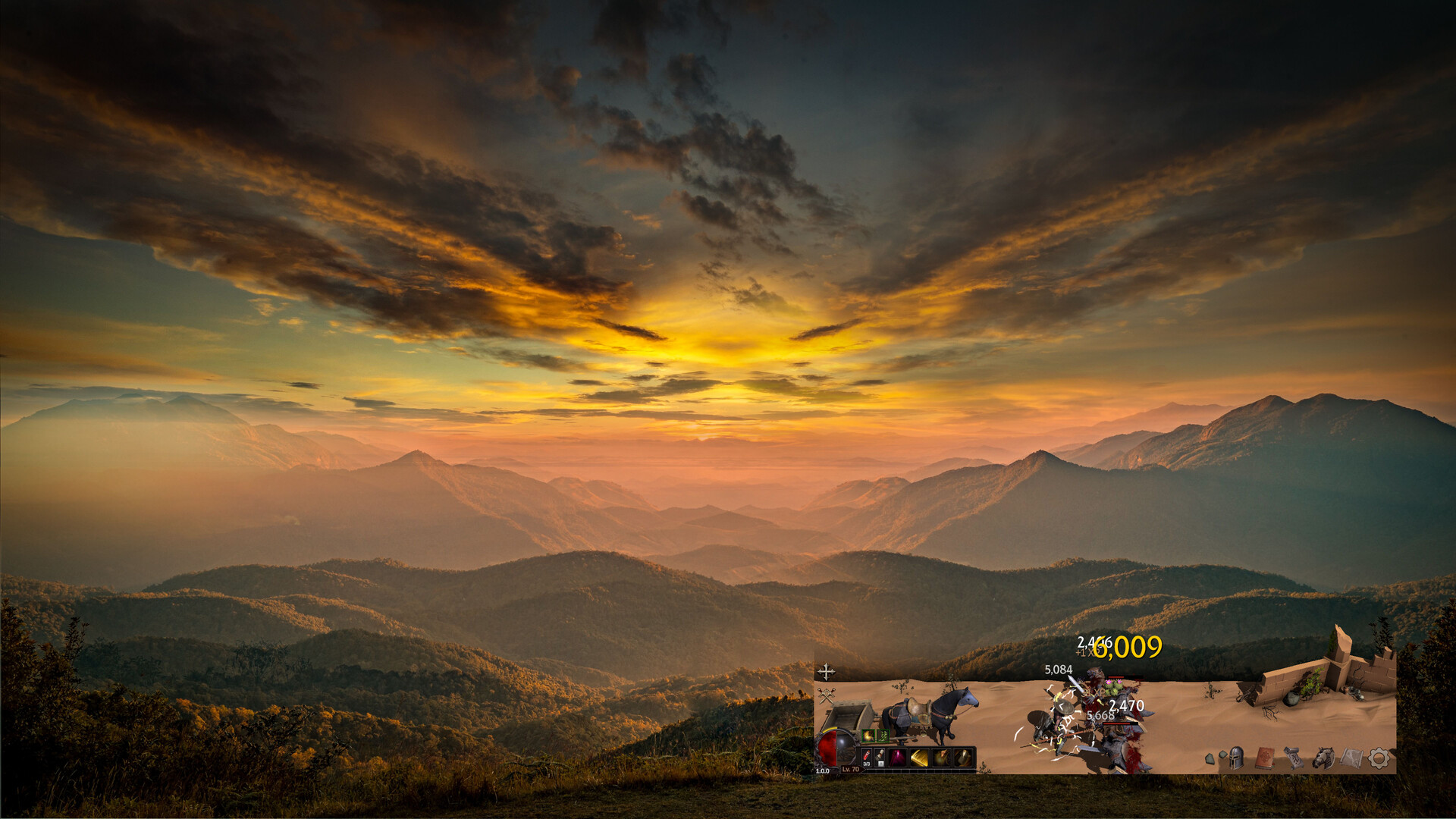
- Players report a width adjustment and a plus-shaped move control on the left side of the game.
- Full screen uses a background image; it does not necessarily enlarge the combat area.
- A reliable height adjustment and a universal multi-monitor fix have not been confirmed.
A desktop strip, with different ways to position it
Deskrawl’s official description says it plays at the bottom of your desktop. That layout is part of the game’s design. Full screen, a narrower strip and moving to another monitor solve different problems; none should be treated as a guaranteed conventional resizable-window mode.
Move it to another monitor
In a September 28 discussion, a player points to a cross-shaped control on the left side for moving the window, and the original poster replies that it helped. Another release-day Windows user reports moving between three monitors by grabbing the in-game plus control.
- Find the plus-shaped move control on the game’s left side.
- Drag with that control to place the game on the display you want.
- Check that the bottom controls and any open menus remain visible after the move.
That is the reported in-game method, not a promise that every monitor arrangement behaves correctly. A September 30 report says the game disappeared below the visible displays after being moved to a second monitor.
Width and height are separate limits
A September 28 ultrawide user specifically reports a width adjustment but asks for height adjustment. October replies repeat the height request. A release-week video also describes shrinking the width. Those reports support narrowing the layout, not freely resizing both dimensions.
| What you want | What the reports support |
|---|---|
| Make the strip narrower | A width adjustment is reported; its exact current menu path is unverified. |
| Move it to a second display | Use the in-game plus-shaped move control described by players. |
| Make the combat area taller | Height adjustment remains unconfirmed; ultrawide users were still requesting it. |
| Fill the empty space above the game | Full-screen mode can display a background image. |
| Temporarily get it out of the way | The separate Boss key is reported as Alt+B. |
Increasing HUD scale is not the same as increasing the play-area height. An October 2 report says a larger HUD scale made the Combat Settings and Drag to Move buttons overlap. If the controls become difficult to use after a scale change, compare the previous setting before making further layout changes.
What full screen changes
Just before release on September 28, developer First Day Dev said full-screen mode would support a preset background or an imported image. Release-day players and a September 29 video then described full screen as filling the space above the combat strip. The imported-image option has not been checked in the current client.
Do not choose full screen expecting a closer camera or a much taller battle view. The useful distinction is whether you want your desktop visible behind the game or an image filling that area. The exact wallpaper count and current import-menu steps are not confirmed.
When menus or displays misbehave
For a talent panel stuck partly off-screen, a June demo thread reports that Reset to Default fixed it. A developer reply in another June thread suggests resetting settings or trying another resolution. This is historical troubleshooting advice, not a verified fix for every release-build display problem.
Record your settings before resetting them, and describe the exact symptom if you need help. An off-screen menu, a missing widescreen resolution and another application turning black are different problems; the old talent-panel fix does not establish a solution for all three.
Linux adds another distinction: October reports describe a working game with an opaque upper window under Proton. If your problem is transparency rather than window size, use the Linux compatibility notes rather than assuming a width setting will fix it.
Sources and scope
Width, monitor movement and full-screen background behaviour, with display bugs and historical fixes kept separate.
- Review status
- Source-reviewed
- Game version
- Steam PC; source-specific dates and demo limits retained.
- Checked
- Method
- Retained source review; draft requires cross-review and current-version gameplay verification. Retained source bundle checked for this release; no current-client gameplay test.
- Deskrawl: Idle ARPG — Official Steam Store first-party
Official desktop-strip design context; no arbitrary resize support inferred.
Checked
- Moving the game to a second monitor community
Community left-side cross control and original-poster confirmation for moving the window.
Checked
- Changing Monitors breaks game community
Release-day Windows three-monitor move-control report; no general monitor guarantee.
Checked
- Height Adjustment :: Deskrawl: Idle ARPG General Discussions community
Width adjustment observed; height remains requested rather than confirmed.
Checked
- Fullscreen Mode :: Deskrawl: Idle ARPG General Discussions community
Developer statement of preset and imported full-screen backgrounds.
Checked
- Reduce the amount of empty space at the top? :: Deskrawl: Idle ARPG General Discussions community
Community distinction between filling upper area and removing it; wallpaper count not adopted.
Checked
- Adjusting the HUD scale in the settings causes the Combat Settings and Drag to Move buttons to overlap :: Deskrawl: Idle ARPG General Discussions community
HUD-scale overlap report, not a confirmed universal defect or fixed workaround.
Checked
- Multi Monitor [BUG] :: Deskrawl: Idle ARPG General Discussions community
Multi-monitor off-screen problem limits claims that dragging always succeeds.
Checked
- (Solved) Talent Tree UI Stuck at Top of Screen – Unable to Move community
Historical Reset to Default troubleshooting, explicitly not current universal fix.
Checked
- [0.1.12] New Content: Ancient Legendary, New Legendaries, Minion, Life Skills community
June developer suggestion to reset settings or try resolutions, labeled demo-era.
Checked
- Does it work on Linux ? :: Deskrawl: Idle ARPG General Discussions community
Linux opaque-background issue differs from width/height settings.
Checked
- Deskrawl: Idle ARPG — Release-Week Overview community
Release-week commentary corroborates width adjustment and full-screen background distinction; not a measured UI test.
Checked